Locks when the screen sleeps
The key is wiped from memory the moment the screen goes dark — folding a foldable counts. One unlock serves the app, the keyboard and autofill together.
Sekuvo is your secure vault: passwords, cards and notes, encrypted on your phone with a key only your master password can derive. It has no server, no account, no sync — and no way to phone home.
Google Play listing is in preparation. Sekuvo is free and GPLv3 — the code is the proof.
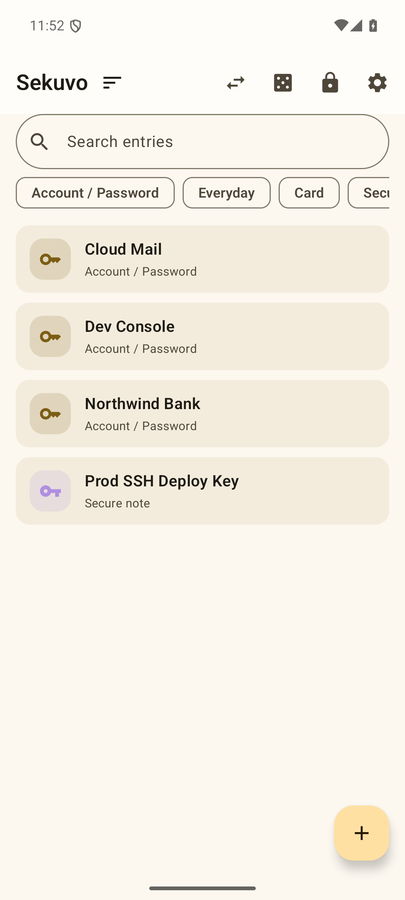
Every password, key and card number on this screen is generated at random in this page — none of it is real, and none of it leaves your browser.
Every sensitive field is sealed with AES-256-GCM. The key never touches a server because there is no server; it is derived on your phone, from your master password, every time you unlock.
The key is wiped from memory the moment the screen goes dark — folding a foldable counts. One unlock serves the app, the keyboard and autofill together.
One encrypted .vaultbak file, stored wherever you choose. File + backup password restores everything on any device — the recovery path is tested end to end.
Forget the master password and the data is gone. That is the design: a door only you can open has no spare key under the mat.
The clipboard is where secrets go to be stolen. Sekuvo types values straight to their destination instead.
Sign-in and card forms offer your entries directly. While locked, the system gets nothing — unlock first, then choose.
Switch to it in any app and type a stored secret into the field — searchable, recents on top, no copy step.
Your phone becomes a Bluetooth keyboard and types the secret at the computer's cursor. Nothing is installed on the computer.
SSH keys, .env files, recovery codes… aktar.html encrypts the secret on your computer and Sekuvo reads it with the camera. No server, no account, no clipboard in between — only light travelling from a screen to a lens.
aktar.html is a single HTML file. Download it, compare its SHA-256 with the value below, and open it from your own disk.
Paste the secret and choose a transfer password. Encryption runs inside the browser, on your machine; the envelope is drawn on screen as QR codes.
In Sekuvo: ➕ → Import via QR. Scan the frames, enter the same password, and the entry lands in your vault.
85ee1729fda96072b36303074f21a170d5361c0577a920ef631bd6884d5b653dRun the command for your system in a terminal; the output must match the value above exactly. The same value is published in the GitHub release notes. You can also keep it in Sekuvo as a Tool anchor (the fingerprint button on the home screen) and compare against your phone the next time you download.
A download, not a web page: the address bar shows file://. sekuvo.com never asks you for a secret.
The Google Play listing is in preparation. Until then you can build from source — the repository README covers it in two commands.
The computer-side tool is a single HTML file — aktar.html — and it is a download, not a web page: it runs entirely on your machine, and this site never asks you for a secret.
github.com → Releases · verify the published SHA-256